Interactive Curriculum Square Banner
If you're promoting a course, launching a new academic program, or sharing an online learning opportunity, the Interactive Curriculum Square Banner gives you a polished, professional foundation—without needing design experience. It’s not just another template. It’s a thoughtfully built vector resource that blends modern visual appeal with real-world flexibility.
What Makes This Banner Stand Out?
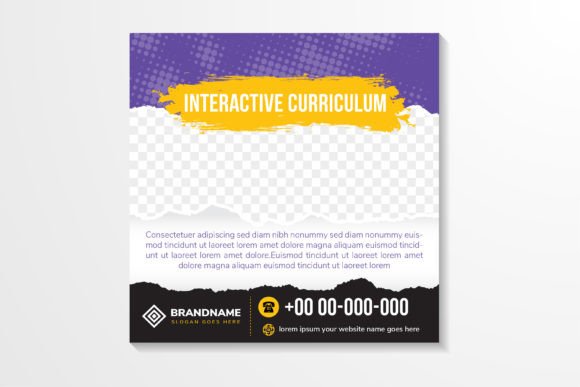
This banner combines clean educational messaging with expressive design elements: a subtle halftone dot pattern, layered torn paper textures, and a balanced square layout ideal for digital platforms. The “interactive” in its name doesn’t refer to clickable functionality—it signals how easily you can adapt every part of it. All text, shapes, colors, and even photo placeholders (like the space-themed college background) are fully editable in Illustrator or compatible software.
Because it’s 100% vector-based and delivered at 300 DPI, you can scale it up for printed flyers or down for Instagram posts—no pixelation, no quality loss. Whether you’re highlighting a summer registration deadline or announcing a new coding bootcamp, this banner keeps your message sharp and on-brand.
Who Benefits Most From This Design?
Educators building course landing pages, small business owners offering workshops, freelance trainers launching online programs, and student clubs promoting campus events—all find value here. You don’t need to be a graphic designer to use it well. If you’ve ever spent hours trying to align text over a background image or struggled to match brand colors across formats, this banner solves those quiet frustrations.
Beginners appreciate the organized layers and clear naming conventions in the AI and EPS files. Professionals love that they can drop in their logo, swap fonts in seconds, and export ready-to-use JPG or SVG versions for email headers, social media covers, or presentation slides.
Real-World Uses You Can Start Today
- Social media promotion: Resize the square banner into a 1080×1080px Instagram post or Facebook cover to announce “Back to School Registration Now Open!” Add your institution’s purple and yellow accents to reinforce recognition.
- Printed admission materials: Use the high-res JPG or PDF version for a physical postcard mailed to prospective students. The torn paper edge adds tactile charm, while the halftone texture gives depth without overwhelming readability.
- Website hero section: Crop the central content area and place it above the fold on your course page. Pair it with a clear CTA like “Enroll Now” or “Download Syllabus” for immediate impact.
- Virtual event branding: Import the SVG into Zoom or Teams as a virtual background during open-house webinars. Its clean layout ensures your face stays visible while the curriculum theme sets the tone.
Why the Details Matter
The halftone pattern isn’t just decorative—it softens transitions between color blocks and adds subtle visual rhythm. The torn paper element introduces organic contrast against sleek digital interfaces, making your message feel both approachable and intentional. And because the background includes a space-themed photo collage (think stars, abstract orbits, or minimalist campus silhouettes), it works equally well for STEM programs, creative colleges, or interdisciplinary learning initiatives.
Colors are pre-selected in accessible contrast ratios—purple and yellow pop without straining the eyes, and black text remains highly legible over light or dark zones. Transparency is used thoughtfully, especially around shadow effects and layered paper cuts, so overlays never look muddy when placed over photos or gradients.
What to Keep in Mind Before You Use It
While this banner is beginner-friendly, a few practical notes help you get the most out of it:
- Fonts aren’t embedded: The download includes editable text, but you’ll need the recommended typefaces installed—or choose system-safe alternatives (like Montserrat or Poppins) for consistent rendering.
- Photo placeholders are suggestions: The included space/college photo is a guide—not a locked asset. Swap it freely with your own high-quality images for stronger personalization.
- SVG works best for web: Use SVG for responsive websites or email footers where crisp scaling matters. For print or complex edits, stick with AI or EPS files.
- Check color mode: Files are set to CMYK for print readiness—but if you’re using them mostly online, switch to RGB in your editor for brighter on-screen results.
A Tool That Grows With Your Needs
Unlike static templates that lock you into one layout, the Interactive Curriculum Square Banner supports iteration. Need a vertical version for Stories? Duplicate the layer group and reflow content. Want to highlight student testimonials instead of course features? Swap out the central shape and adjust the halftone density to keep focus where it belongs.
It’s also versatile beyond education—coaches, nonprofits, and community centers repurpose it for workshop announcements, volunteer drives, or membership campaigns. The torn paper and dot patterns lend themselves naturally to handmade, authentic, or youth-oriented branding—so whether you're targeting college freshmen or adult learners returning to study, the tone adapts gracefully.
Final Thought: Design Should Serve Your Message
You’re not buying pixels—you’re investing in clarity, consistency, and time saved. Every element in this banner exists to support your goal: helping people understand what you offer, why it matters, and how to take the next step. When your visuals work quietly in the background—elegant but unobtrusive, flexible but cohesive—you free up mental space to focus on what really counts: teaching, connecting, and growing.
If you value clean structure, thoughtful detail, and the freedom to make something truly yours, this is more than a banner. It’s a reliable starting point—one that looks polished from day one and evolves with every new idea you bring to it.